Monday, July 12, 2021

Customized PWC Table


ODM Master Sheet Tables:

 PWC_ODM_JOB_CLUBBING_TERRY   --job name

PWC_ODM_HISTORY_JOB_TERRY   ----job history

PWC_ODM_HISTORY_TERRY    --------item history

PWC_ODM_COMPO_CODE_TERY_GREIGE   ------Yarn/Greige

PWC_ODM_COMPO_CODE_TERY_CHMCL   ------Chemical

PWC_ODM_COMPO_CODE_TERY_ACSORS  ------Accessories

PWC_ODM_JOB_COMPONENTS_TERRY_V  -------Components


PWC_ODM_JOB_CLUBBING_WVNG   ------job name

PWC_ODM_HISTORY_JOB_WVNG   -------job history

PWC_ODM_HISTORY_WVNG       -------item histiry

PWC_ODM_COMPO_CODE_WVNG_GREIGE  -----Yarn/Greige

PWC_ODM_COMPO_CODE_WVNG_CHMCL  -----Dyes/Chemicals


PWC_ODM_MASTER_SHT_PRCSNG_LINE  -----batch details

PWC_ODM_MASTER_SHT_JOB_PRCSNG   -----job name

PWC_ODM_MSTR_SHT_RESURC_PRCSNG  -----routing details

PWC_ODM_MSTR_SHT_PRCSNG_FBRC    -----fabric details

PWC_ODM_MSTR_HSTRY_PRCSNG       -----job history

PWC_ODM_MASTER_SHT_PRCSNG_HDR   -----header

PWC_ODM_INSP_PRC_FAULT_ENTRIES  -----inspection faults

PWC_ODM_MSTR_SHT_TL_VLM_PRCSNG  -----volume calculation

PWC_ODM_MSTR_SHT_PRCSNG_CHMCL   -----chemical details

NG_ODM_ORDER_WISE_JOB_DTLS_V    NOWJV


ED Form All Tables:


PWC_ED_COMERCIL_CONTNR_DETL

PWC_ED_COMMERCIAL_FORM_TT_REF

PWC_ED_COMMERCIAL_INVOICE_HDR

PWC_ED_COMMERCIAL_INVOICE_L

PWC_ED_EXPORT_ATTACHMENT

PWC_ED_EXPORT_FORM_HEADER

PWC_ED_EXPORT_FORM_MASTER_LC

PWC_ED_EXPORT_FORM_PI_HDR

PWC_ED_EXPORT_FORM_PI_LINES

PWC_ED_EXPORT_FORM_RECEIPT

PWC_ED_EXPORT_FORM_TT_REF

PWC_ED_REMITTANCE_HDR

PWC_ED_REMITTANCE_LINE


OTL NG Tables:

NG_HO_OTL_INT_FCT  ----- To get data from timecard interface.
TEMP_OTL_MACHINE_DATA  ---- To get data migration information for head office.
TEMP_TIME_LABOR_INTERFACE ---- To get data migration information for factory.

Difference Between date in Time formate


SELECT FLOOR ( ( (sysdate - (sysdate-1)) * 24 * 60 * 60) / 3600)          || ' HOURS ' ||

           FLOOR((((sysdate - (sysdate-1))*24*60*60) -
           FLOOR(((sysdate - (sysdate-1))*24*60*60)/3600)*3600)/60)
           || ' MINUTES ' ||
           ROUND((((sysdate - (sysdate-1))*24*60*60) -
           FLOOR(((sysdate - (sysdate-1))*24*60*60)/3600)*3600 -
           (FLOOR((((sysdate - (sysdate-1))*24*60*60) -
           FLOOR(((sysdate - (sysdate-1))*24*60*60)/3600)*3600)/60)*60) ))
          || ' SECS ' time_difference from dual

Machine Data

 SELECT 

         OTL.EMPLOYEE_ID ERP_NUMBER,

         PAPF.FULL_NAME  EMPLOYEE_NAME,

         TO_CHAR(OTL.ATTD_DATE, 'DD-MON-YYYY') ATTD_DATE,

--         OTL.ATTD_TIME,

         TO_CHAR(OTL.ATTD_TIME, 'HH24:MI:SS AM') ATTD_TIME,

--         (SELECT NG_ORGANIZATION_TYPE (PAAF.ORGANIZATION_ID)

--          FROM DUAL) ORG_TYPE,

--         (SELECT NG_ORGANIZATION_NAME (PAAF.ORGANIZATION_ID)

--          FROM DUAL) ORG_NAME,

         (SELECT NG_DESIGNATION (PAAF.POSITION_ID)

          FROM DUAL) DESIGNATION,

         REGEXP_SUBSTR (HAOU.NAME, '(\S*)(\.)') DEPARTMENT,

         HAOU.NAME UNIT_NAME

--         HAOU.ORGANIZATION_ID

FROM 

        PER_ALL_PEOPLE_F            PAPF 

       ,PER_ALL_ASSIGNMENTS_F       PAAF    

       ,TEMP_OTL_MACHINE_DATA       OTL

       ,HR_ALL_ORGANIZATION_UNITS   HAOU

WHERE 

     1 = 1

AND  PAAF.PERSON_ID       =     PAPF.PERSON_ID

AND  PAPF.EMPLOYEE_NUMBER =     OTL.EMPLOYEE_ID

AND SYSDATE BETWEEN PAAF.EFFECTIVE_START_DATE   AND PAAF.EFFECTIVE_END_DATE 

AND SYSDATE BETWEEN PAPF.EFFECTIVE_START_DATE   AND PAPF.EFFECTIVE_END_DATE 

AND PAAF.ORGANIZATION_ID    =   HAOU.ORGANIZATION_ID

--AND OTL.EMPLOYEE_ID       =   4328

AND OTL.UNIT_NAME = 'Gulshan Office Chairman House Unit 2'

AND OTL.ATTD_DATE between '06-jan-2021' and '06-jan-2021'

--AND OTL.ATTD_DATE = '10-dec-2020'

ORDER BY  DEPARTMENT, ERP_NUMBER

Delete OTL Timecard

  set serveroutput on;

declare


CURSOR building_block_id_csr (c_resource_id NUMBER, 

                     c_start_time DATE,

                     c_stop_time DATE) IS

select time_building_block_id 

  from hxc_time_building_blocks 

start with resource_id = c_resource_id 

       and trunc(start_time) = c_start_time

       and trunc(stop_time) = c_stop_time

connect by prior time_building_block_id = parent_building_block_id

        and prior object_version_number = parent_building_block_ovn

order by time_building_block_id;


CURSOR app_period_csr (c_resource_id NUMBER, 

                   c_start_time DATE,

                   c_stop_time DATE) IS

  select time_building_block_id

    from hxc_time_building_blocks

   where scope = 'APPLICATION_PERIOD'

     and resource_id in (c_resource_id) 

     and trunc(start_time) = c_start_time

     and trunc(stop_time) = c_stop_time ; 


TYPE numtab IS TABLE OF NUMBER INDEX BY BINARY_INTEGER;

tbb_id_tab numtab;

app_period_tab numtab;


l_retrieval_count NUMBER;

l_resource_id  NUMBER;

l_start_time DATE;

l_stop_time DATE;

l_item_key wf_items.item_key%TYPE;


begin


  dbms_output.put_line('Start processing...');


  l_resource_id := 17555; /* This is person id*/

  l_start_time := '31-OCT-2020';

  l_stop_time := '31-OCT-2020';


  /* l_resource_id := &1; 

  l_start_time := &2;

  l_stop_time := &3; */


  DELETE 

  FROM    hxc_transaction_details

  WHERE   time_building_block_id IN

        (

        SELECT  time_building_block_id

        FROM    hxc_latest_details

        WHERE   resource_id IN (l_resource_id)

        AND     trunc (start_time) = l_start_time

        );


  select count(*) 

    into l_retrieval_count

    from hxc_transactions ht,

         hxc_transaction_details htd

   where ht.transaction_id = htd.transaction_id

     and ht.type = 'RETRIEVAL'

     and ht.status = 'SUCCESS'

     and htd.status = 'SUCCESS'

     and htd.time_building_block_id in

       (select time_building_block_id from hxc_latest_details

         where resource_id in (l_resource_id) 

           and trunc(start_time) = l_start_time) ;


  dbms_output.put_line('l_retrieval_count = '||l_retrieval_count);


 IF (l_retrieval_count <> 0) THEN

   dbms_output.put_line('**********************************************************');

   dbms_output.put_line('This timecard has been successfully retrieved atleast once');

   dbms_output.put_line('DO NOT USE THIS SCRIPT TO DELETE DATA FOR THIS TIMECARD');

   dbms_output.put_line('Exiting .....');

   dbms_output.put_line('**********************************************************');


 ELSE


  OPEN app_period_csr (l_resource_id, l_start_time, l_stop_time);

  FETCH app_period_csr BULK COLLECT INTO 

        app_period_tab;

  CLOSE app_period_csr;  


  OPEN building_block_id_csr (l_resource_id, l_start_time, l_stop_time);

  FETCH building_block_id_csr BULK COLLECT INTO 

        tbb_id_tab;

  CLOSE building_block_id_csr;


  dbms_output.put_line('tbb_id_tab.COUNT = '||tbb_id_tab.COUNT);    


  -- Process TIMECARD, DAY, DETAIL scope building block ids

  IF (tbb_id_tab.COUNT > 0) THEN


    FORALL i IN tbb_id_tab.FIRST..tbb_id_tab.LAST 

      DELETE FROM hxc_time_building_blocks

       WHERE time_building_block_id = tbb_id_tab(i);


    dbms_output.put_line('Deleted from hxc_time_building_blocks... ');     


    FORALL i IN tbb_id_tab.FIRST..tbb_id_tab.LAST 

      DELETE FROM hxc_time_attributes

       WHERE time_attribute_id IN

           (select time_attribute_id from hxc_time_attribute_usages

             where time_building_block_id = tbb_id_tab(i));


    dbms_output.put_line('Deleted from hxc_time_attributes... ');                  


    FORALL i IN tbb_id_tab.FIRST..tbb_id_tab.LAST 

      DELETE FROM hxc_time_attribute_usages

       WHERE time_building_block_id = tbb_id_tab(i);


    dbms_output.put_line('Deleted from hxc_time_attribute_usages... ');            


    FORALL i IN tbb_id_tab.FIRST..tbb_id_tab.LAST 

      DELETE from hxc_tc_ap_links

       WHERE timecard_id = tbb_id_tab(i);


    dbms_output.put_line('Deleted from hxc_tc_ap_links... ');     


    FORALL i IN tbb_id_tab.FIRST..tbb_id_tab.LAST 

      DELETE FROM hxc_latest_details

       WHERE time_building_block_id = tbb_id_tab(i);       


    dbms_output.put_line('Deleted from hxc_latest_details... ');     


    FORALL i IN tbb_id_tab.FIRST..tbb_id_tab.LAST 

      DELETE FROM hxc_ap_detail_links

       WHERE time_building_block_id = tbb_id_tab(i);   


    dbms_output.put_line('Deleted from hxc_ap_detail_links... ');     


    FORALL i IN tbb_id_tab.FIRST..tbb_id_tab.LAST 

      DELETE from hxc_transactions

       WHERE transaction_id in

            (select transaction_id from hxc_transaction_details

              where time_building_block_id = tbb_id_tab(i));


    dbms_output.put_line('Deleted from hxc_transactions... ');     


    FORALL i IN tbb_id_tab.FIRST..tbb_id_tab.LAST 

      DELETE from hxc_transaction_details

       WHERE time_building_block_id = tbb_id_tab(i);    


    dbms_output.put_line('Deleted from hxc_transaction_details... ');         


     FORALL i IN tbb_id_tab.FIRST..tbb_id_tab.LAST 

      DELETE from HXC_PA_LATEST_DETAILS 

       WHERE time_building_block_id = tbb_id_tab(i);    


     dbms_output.put_line('Deleted from HXC_PA_LATEST_DETAILS  ');  


     FORALL i IN tbb_id_tab.FIRST..tbb_id_tab.LAST 

      DELETE from HXC_PAY_LATEST_DETAILS

       WHERE time_building_block_id = tbb_id_tab(i);    


     dbms_output.put_line('Deleted from HXC_PAY_LATEST_DETAILS ');  


     FORALL i IN tbb_id_tab.FIRST..tbb_id_tab.LAST 

      DELETE from HXC_RET_PA_LATEST_DETAILS

       WHERE time_building_block_id = tbb_id_tab(i);  

      dbms_output.put_line('Deleted from HXC_RET_PA_LATEST_DETAILS ');  


     FORALL i IN tbb_id_tab.FIRST..tbb_id_tab.LAST 

      DELETE from HXC_RET_PAY_LATEST_DETAILS 

       WHERE time_building_block_id = tbb_id_tab(i);  

   dbms_output.put_line('Deleted from HXC_RET_PAY_LATEST_DETAILS  ');  


   BEGIN

    -- abort the workflows

    FOR i IN tbb_id_tab.FIRST..tbb_id_tab.LAST 

    LOOP


      SELECT approval_item_key 

        INTO l_item_key

        FROM hxc_timecard_summary

       WHERE timecard_id = tbb_id_tab(i);


      wf_engine.abortprocess('HXCEMP', l_item_key);

      wf_purge.items('HXCEMP',l_item_key,SYSDATE,FALSE);


    END LOOP;

   EXCEPTION 

        when NO_DATA_FOUND then

         DBMS_OUTPUT.PUT_LINE('There is no workflow found');

       when OTHERS then

         DBMS_OUTPUT.PUT_LINE('Workflow not found');

  END;


    FORALL i IN tbb_id_tab.FIRST..tbb_id_tab.LAST 

      DELETE from hxc_timecard_summary

       WHERE timecard_id = tbb_id_tab(i);  


    dbms_output.put_line('Deleted from hxc_timecard_summary... ');         


  END IF;


  dbms_output.put_line('Process the application periods... ');     


-- Process the application period scope building block ids


  dbms_output.put_line('app_period_tab.COUNT = '||app_period_tab.COUNT);  


  IF (app_period_tab.COUNT > 0) THEN


    -- abort the workflows

  BEGIN

    FOR i IN app_period_tab.FIRST..app_period_tab.LAST 

    LOOP


      SELECT approval_item_key 

        INTO l_item_key

        FROM hxc_app_period_summary

       WHERE application_period_id = app_period_tab(i);


      wf_engine.abortprocess('HXCEMP', l_item_key);

      wf_purge.items('HXCEMP',l_item_key,SYSDATE,FALSE);


    END LOOP;

    EXCEPTION 

        when NO_DATA_FOUND then

         DBMS_OUTPUT.PUT_LINE('There is no workflow found1');

       when OTHERS then

         DBMS_OUTPUT.PUT_LINE('Workflow not found1');

  END;


    FORALL i IN app_period_tab.FIRST..app_period_tab.LAST 

      DELETE FROM hxc_app_period_summary

       WHERE application_period_id = app_period_tab(i);       


    dbms_output.put_line('Deleted from hxc_app_period_summary... ');         


  END IF;


 END IF;


end;

/

Necessary Website Link


For Oracle: 

http://learnoraclecsbscm.blogspot.com/

http://oracleapps88.blogspot.com/

http://www.erpschools.com/category/sysadmin-and-aol

http://appsr12help.blogspot.com/

http://oracleebspro.blogspot.com/

http://islandapps.blogspot.com/

https://agarwalsajal.wordpress.com/

http://lifeofanoracleprodigy.blogspot.com/

https://www.123techguru.com/courses/create-concurrent-program-in-oracle-apps/

http://mujahidalishahani.blogspot.com/

https://www.oracleappsdna.com/

http://www.shareoracleapps.com/p/var-acctoctrue.html

https://www.oracleapps2fusion.com/2016/01/ap-invoice-technical-details-with.html?m=0

http://appselangovan.blogspot.com/2013/06/wip-tables.html

https://www.ktexperts.com/category/oracle-dba/


https://beginnersbook.com/2015/04/dbms-tutorial/
http://subeen.com/
https://programabad.com/ 

Remove Special Character

 REGEXP_REPLACE(AC.CUSTOMER_NAME,'[^'||CHR(1)||'-'||CHR(127)||']','')

For Example:

SELECT REGEXP_REPLACE(AC.CUSTOMER_NAME,'[^'||CHR(1)||'-'||CHR(127)||']','') AS CUSTOMER_NAME   FROM AR_CUSTOMERS  AC  WHERE AC.CUSTOMER_ID = 253889

How to Display Leading Zeros in XMLP Report – Excel Output


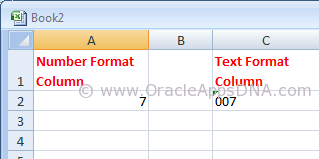
Microsoft Excel has a tendency to display number format based columns with no prefix of ZEROs. For example, if there is a value ‘007’ excel displays it as ‘7’, excel display it as ‘007’ only if the column is set in text format. You can see the difference in the below screenshot
String vs Number in Excel

Please go through the below URL for an example to generate an XMLP report:
http://oracleappsdna.com/2013/07/plsql-script-to-generate-xml-tags-for-xmlp-report/

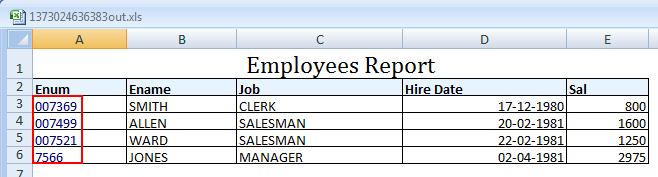
In the example mentioned in the above URL you could see the output as shown in the below screenshot
Emp Report Output

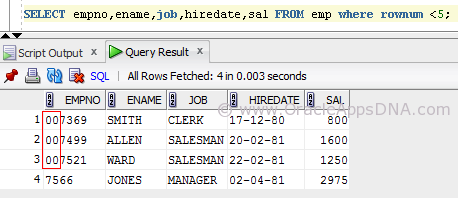
But if you observe the data in the emp table, you could see three rows have leading zeros for employee number( Please note, I have updated the data of seeded emp table with prefix of 00 and also changed the data type of empno column to varchar2(6) for the sake of example.)
EmpTable

As the output is of excel type the empno column is considered as Number column (as the entire column consists of number format data) and the leading zeros are removed in display.

We have multiple ways to resolve this, I have listed them below.

Method 1

  1. Open the RTF Template in MS Word.
  2. Go to Data -> Load XML Data.
  3. Once the data is loaded successfully, double click on that field.
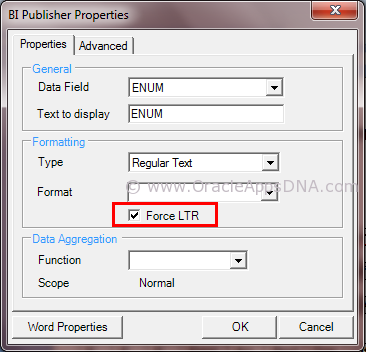
  4. Under field properties window set the field formatting type as “Regular Text” and set the check box “Force LTR”.

Force_LTR_TO_Show_Leading_Zeros_for_a_Number

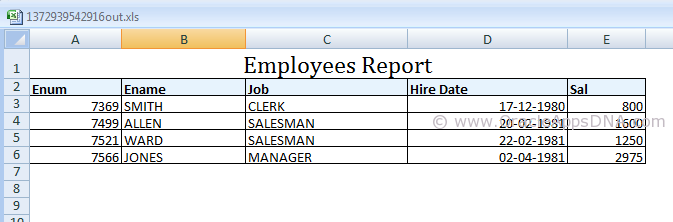
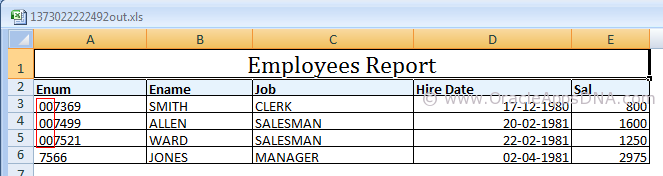
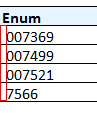
After following the above said steps, save the template and preview the output which is as shown below
Correct Output

Method 2

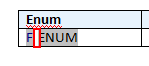
Add Ctrl+Shift+Space after/before emplyee number on template to create a non-breaking space. The non-breakable space converts the number column to string column
Emp_RPT_shift+ctrl+space

Disadvantage of this method is that the non-breakable space is visible in the output as well, you can see in the screenshot below
space in emp number

Method 3

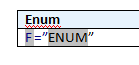
This is the best method I have found, In this method we need to use an equal-to symbol before the field and enclose the field in double quotes for example:- =”ENUM”

This works only in excel however it will allow you to cut and paste (ie to use the value to search in Oracle) and also to do vlookups.
Enum with equalto and quotes

The theory is that excel will concatenate the values together because it has quotes around it, it will treat it as a string rather than simply a value.

For any other formats this method will not work.
Final Emp Output

You can see in the above screenshot that Enum column values are turned to blue color as the content is explicit converted to text format from number format.

Hope this article is useful for those who are in need to show leading zeros for number columns in XMLP reports. If you have any best solution, please leave a comment and share with the readers.

Credits:- Thanks to my friend Kiran Reddy for helping me to get this knowledge.

UPDATE: on 20-OCT-2015

Method 4

Here is another way to set format style ‘Force LTR’ in a programmatic way to prevent Excel from suppressing leading zeros:

<fo:bidi-override direction="ltr" unicode-bidi="bidi-override">
<?XML_ELEMENT?>
</fo:bidi-override>