Showing posts with label Sys Admin. Show all posts

Thursday, July 15, 2021

Value Sets: Independent, Dependent, Table


To demonstrate different types (Independent, Dependent and Table) of value set let’s first define a concurrent program.

1. Define Executable.
Navigation: Application Developer > Concurrent > Executable

Conc Prog 1

Enter Information as below
Note: You don’t really need to have PLSQL package defined for this demo.

Conc Prog 2

Save it.
Navigation: Application Developer > Concurrent > Program

Conc Prog 3

Enter Information as below

Conc Prog 4

Save it.

Assign this Concurrent program to “Application Developer” responsibility by adding it to Request group

Conc Prog 7

Note: Form more information about defining concurrent program and adding it to request group follow the below tutorial
http://erpschools.com/articles/concurrent-program-registration-and-add-it-to-request-group

Now Start Defining Value Sets.

Independent Value Set:

Navigation: Application Developer > Application > Validation > Sets

value sets 1

value sets 2

Enter information as below

value sets 3

Save it.

value sets 4

Create Values for the value set we defined above

Navigation: Application Developer > Application > Validation > Values

value sets 5

Enter information as below

value sets 6

Save it.

Attach this value set to Concurrent program parameter

Navigation: Application Developer > Concurrent > Program > Parameters

Conc Prog 4

Enter information as below

Conc Prog 5

Save it.

To test the value set try submitting the concurrent program

Navigation: Application Developer > View > Requests > Submit New Request > Single Request > OK

Conc Prog 9

Conc Prog 10

Enter Concurrent Program Name that we defined at the beginning of this tutorial

Conc Prog 11

Click on LOV button to see the values available for this parameter.

Conc Prog 12

———————————————————————————

Dependent Value Set

To define a Dependent value set we also need one Independent value set.

Example: To List down States in a Country we need to have list of Countries for which states need to be defined.

First Define list of countries in a independent value set

Navigation: Application Developer > Application > Validation > Sets

value sets 8

Enter Values for the above value set

Navigation: Application Developer > Application > Validation > Values

value sets 9

Enter Values in the below screen

value sets 10

Now define another Value set

Navigation: Application Developer > Application > Validation > Sets

value sets 11

Click Edit Information Button to link this Dependent Value set with Independent Value set defined in previous step

value sets 12

Enter Values for each country

Navigation: Application Developer > Application > Validation > Values

Ensure to Select Country name in “Independent Value” field before click Find.

value sets 13

Click Find and enter states for Country India

value sets 14

Save it

Now repeat the above two steps to enter states of country USA

value sets 15

Ensure to select country as USA before clicking Find button

value sets 16

Save it.

Navigate to Concurrent Program Parameters screen and enter Country parameter as shown below

Navigation: Application Developer > Concurrent > Program > Query our Concurrent Program > Parameters

Conc Prog 13

Save it.

Add another parameter to link State Value set as shown below

Conc Prog 14

Save it.

To test “Dependent Value set” navigate to concurrent program submission window

Conc Prog 15

Select country and you can observe that list of values in State parameter will change automatically depending on value select in Country parameter field.

Conc Prog 16

Conc Prog 17

——————————————————————————–

Table Type Value Set

Navigation: Application Developer > Application > Validation > Sets

value sets 18

Select Validation type as “Table” and click Edit Information button

Enter information as below

value sets 19

Click Test button validate the information that is entered

value sets 20

Navigate to Concurrent Program Parameters screen and add fourth parameter

value sets 21

Navigate to Concurrent Program Submission window to check the list of values in Parameter-4

Click LOV button on Order Number field to see list of values available from OE_ORDER_HEADERS_ALL table.

These values change dynamically as data changes in the OE_ORDER_HEADERS_ALL table.

Conc Prog 18

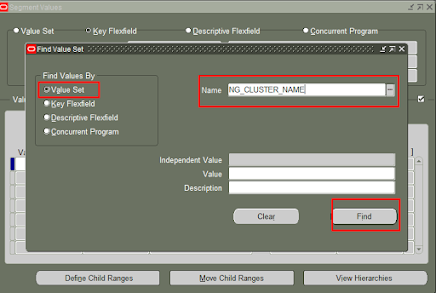
How To Set Fixed OR Non Dependent Value


At first go to:

    Application Developer > Application > Set

Then Fill this data and create value set name:


After create value set name then register the value for value set.

And Go to:
NG_ITEM_REGISTRATION > Register Flex Value > Flexfields > Key:


Tuesday, July 13, 2021

ROLES & RESPONSIBILITIES OF ORACLE APPS DBA


INTRODUCTION TO ORACLE APPS DBA

Oracle APPS DBA:

What is Application Database?

The Database which is storing the data’s from application (say front end ) that is EBS (Enterprise Business suite) is said to be Application Database .

What is EBS?

Oracle E-Business Suite is one of Oracle Corp’s major product lines. Also known as Oracle EBS, it is an integrated set of business applications for automating customer relationship management (CRM), enterprise resource planning (ERP), supply chain management (SCM), human resource management (HRMS)etc.  processes within organizations. This for Whole is Application

What is Database?

A database is collection of data’s That is in the form of objects.

Objects List

  1. Tables
  2. Views
  3. Synonyms
  4. Sequence
  5. Triggers
  6. Functions
  7. Packages
  8. Procedures
  9. Roles Etc.

These are Database Objects When the database is up and Running.

The Person Who is maintaining both application and database is APPS DBA.

Roles and Responsibilities Of Oracle APPS DBA

  • Installation, configuration and upgrading of Oracle server software and related products.
  • Starting and Stopping the application
  • Monitoring the application related products like oacore,oafm apache etc.
  • Bouncing apache,oacore,oafm if needed
  • Establish and maintain backup and recovery policies and procedures.
  • Take care of the Database design and implementation.
  • Implement and maintain database security (create and maintain users and roles, assign privileges).
  • Work as part of a team and provide 24×7 support when required
  • Perform general technical trouble shooting and give consultation to development teams.
  • Interface with Oracle Corporation for technical support.
  • Patch Management and Version Control.
  • Perform database tuning and performance monitoring.
  • Perform application tuning and performance monitoring.
  • Cloning DEV and TEST from PROD.

Prerequisites for Learning Oracle APPS DBA

  • Good Knowledge in OS like Linux, IBM(UIX), Windows etc.as oracle software will be installed on these OS’s.
  • Good Knowledge in sql and PlSQL.
  • Very good understanding of Oracle core database architecture and concepts
  • Oracle SQLNet configuration and working knowledge
  • Knowledge on Concurrent managers

Daily activities are performed by the “Oracle Apps DBA” is mention below: –

There are mainly 4 types of roles an Oracle Apps DBA have :

Type 1:  L1 Apps DBAs

  • L1 Apps DBAs mainly involve in help desk activities such as:
  • Answering calls
  • Logging/updating tickets
  • Interacting with L2 Apps DBAs on tasks to be completed
  • Monitoring alerts

Type 2:  L2 Apps DBAs

L2 Apps DBAs mainly work on daily/scheduled/ad-hoc activities such as:

  • Code Migration Support to Functional Consultants
  • Handling tickets raised by functional/technical/business users
  • Handling Alerts raised by alert monitoring system from Database and applications
  • Tablespace Reorg Activities to improve the performance/to reclaim the unused space
  • Schema Reorg Activities to improve the performance
  • Patch Analysis where there is a patch needs to be applied
  • Patch Application as per schedule
  • Cloning as per schedules
  • Backups and issues related to them
  • Query response time and other Performance Issues
  • Work with Oracle Support by raising SRs on several issues
  • Monitoring Standby Databases and resolve respective issues
  • Regular database maintenance activities (tablespace management, datapump, purging logfiles……)
  • Training L1 Apps DBAs to make them L2 Candidates.

L1 and L2 Apps DBAs are the main teams who will impact SLAs of a client

Type 3:  L3 Apps DBAs

  • L3 Apps DBAs mainly work on installation/setup related tasks such as:
  • Work on issues which L2 couldn’t fix
  • New Environments Build/Setups
  • Designing Backup/Recovery policies
  • Installing new Application environments
  • Post-Installation Tasks of New environments
  • Integrating E-Business Suite with other environments such as (SOA, OSB, OBIEE, OTM, IPM …)
  • Work on integration issues
  • Work on Cluster setups for both applications and databases
  • Work on DMZ setups to E-Business Suite
  • Work on Standby site setups for both applications and databases
  • Interact with Network/OS teams on network setups and load balancer setups.
  • Work on Parallel Concurrent Processing (PCP) Setups
  • Fail-over capabilities testing of E-Business Suite and database
  • Design Cloning strategies.
  • Work on design related issues.

Setting up E-Business Suite with Oracle Access Manager/OID to achieve Single Sign-On (SSO) Capabilities

Training L2 team to make them L3 Candidates

Type 4:  Architects

Architects are the ones who design systems from scratch.  They mainly involve in:

  • Attend Client Meetings to understand their expectations.
  • Involve in Business User Meetings to understand their expectations.
  • Design E-Business Suite Architecture with failover/failback capabilities.
  • Design Clustering capabilities of E-Business Suite and databases.
  • Design High availability of E-Business Suite and databases.
  • Design hardware/capacity sizing.
  • Helping L3 Team to achieve their targets and in understanding technologies.
  • Conduct training sessions to the L3 team to get an understanding of system design.
  • Fix any architectural related issues.

Work on integration options of E-Business Suite with other environments such as (SOA, OSB, OBIEE, OTM, IPM …)